
Document Chat AI: Talk to Your Contracts Like a Lawyer
Revolutionary AI lets you ask questions about your contracts in plain English. Extract key terms, identify risks, and understand obligations without reading 50 pages.
Emily Watson
AI Product Manager
Document Chat AI: Talk to Your Contracts Like a Lawyer
How many times have you stared at a 50-page contract wondering "When does this renew?" or "What's my cancellation policy?" Reading every clause is time-consuming. Missing a key detail is expensive. Document Chat AI solves both problems.
What is Document Chat AI?
Document Chat AI uses large language models (like GPT-4) to understand your documents and answer questions in natural language. Think of it as having a lawyer on standby who's read every contract you've ever signed.
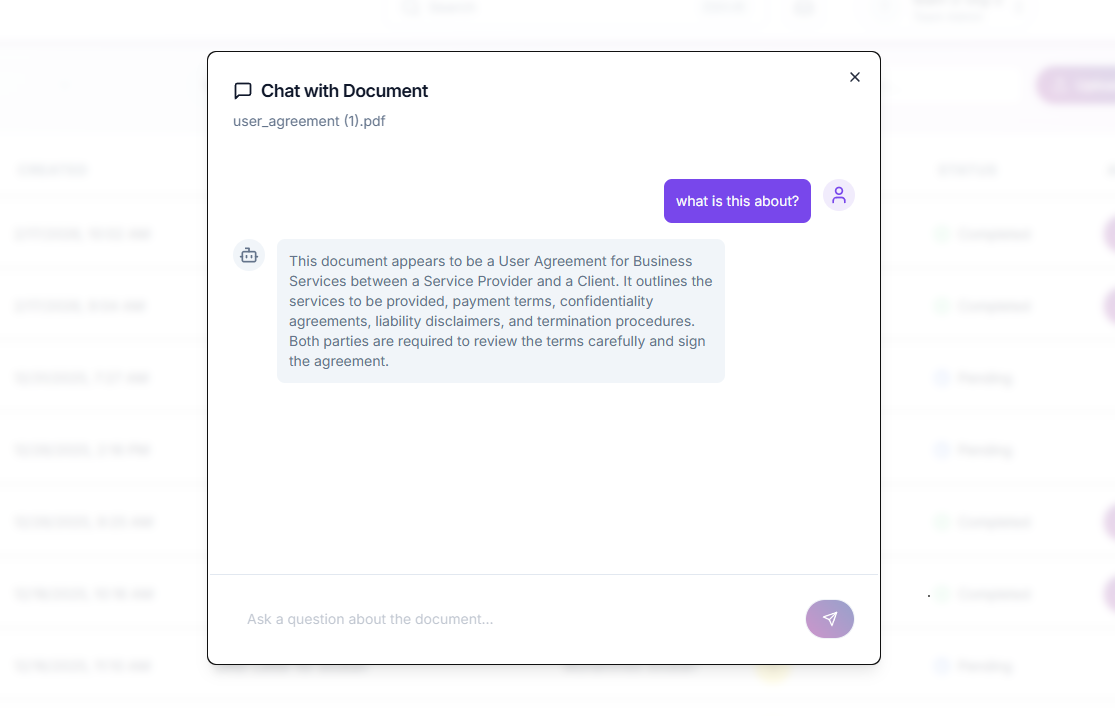
!Chat with Document — ask any question about your contract in Space Sign
How It Works
1. Upload Document
1const document = await client.documents.upload({
2  file: './vendor-contract.pdf',
3  title: 'Software Vendor Agreement'
4});
2. AI Analyzes Content
3. Ask Questions in Plain English
1const response = await client.ai.chat({
2  documentId: document.id,
3  question: "When does this contract auto-renew?"
4});
5
6console.log(response.answer);
7// "This contract auto-renews annually on January 1st
8//  unless cancelled with 90 days written notice. See
9//  Section 12.3 'Term and Termination' for details."
4. Get Instant Answers
!Document Chat answering questions about contract terms
Real-World Use Cases
1. Contract Review (Legal Teams)
Scenario: Law firm reviews 200+ vendor contracts per month
Old Process:
With Document Chat AI:
ROI: 80% time reduction = $500-750 saved per contract
2. Sales Contract Negotiations
Scenario: Enterprise sales rep negotiating terms with legal
Common Questions:
Without AI: Email legal, wait 24-48 hours, lose deal momentum
With AI: Get answers in seconds, keep negotiation moving
3. Procurement & Vendor Management
Scenario: Company with 500+ active vendor contracts
Challenges:
Solution with Document Chat AI:
1// Query across all vendor contracts
2const expiringContracts = await client.ai.batchQuery({
3  documents: vendorContracts,
4  question: "What is the contract end date and renewal terms?"
5});
6
7// Get structured data
8expiringContracts.forEach(contract => {
9  console.log(`${contract.vendor}: Expires ${contract.endDate},
10              Renewal: ${contract.renewalTerms}`);
11});
4. Real Estate Due Diligence
Scenario: Investor acquiring commercial property with 30 tenant leases
Key Questions:
Traditional: Hire paralegal to read all leases ($3,000-5,000)
With AI: Upload all leases, ask questions, get instant report ($100)
5. HR Policy Compliance
Scenario: HR manager handling employee questions
Employee Questions:
Without AI: Read employee handbook every time
With AI: Instant accurate answers with handbook citation
Practical Examples
Example 1: Understanding Termination Rights
Question: "Can I cancel this contract early, and if so, what's the penalty?"
AI Response:
1Yes, early termination is allowed under Section 8.2 "Termination for Convenience."
2
3Termination Terms:
4• You may terminate with 60 days written notice
5• Early termination fee: $5,000 or 3 months of service fees (whichever is less)
6• Must return all confidential information within 10 days
7• Prepaid fees are non-refundable
8
9To terminate, send written notice to: contracts@vendor.com
10
11Relevant Sections:
12• Section 8.2 - Termination for Convenience
13• Section 11.4 - Return of Materials
14• Section 6.1 - Fees and Payment Terms
15
16Confidence: 95%
Example 2: Liability Analysis
Question: "What's our maximum liability exposure under this contract?"
AI Response:
1Your maximum liability is capped at $100,000 (see Section 9.3).
2
3Exceptions (unlimited liability):
4• Breach of confidentiality obligations
5• Intellectual property infringement
6• Gross negligence or willful misconduct
7• Death or bodily injury
8
9Note: Customer's liability is capped at total fees paid in
10previous 12 months, which creates an asymmetric risk.
11
12Recommendation: Consider negotiating equal liability caps.
13
14Confidence: 98%
Example 3: Data Privacy Compliance
Question: "Does this vendor agreement comply with GDPR?"
AI Response:
1Partial compliance detected. Missing key GDPR requirements:
2
3✅ Present:
4• Data processing purposes defined (Section 5.1)
5• Security obligations (Section 7.2)
6• Notification of breaches within 72 hours (Section 7.4)
7
8❌ Missing:
9• No Data Processing Agreement (DPA) attached
10• Sub-processor list not provided
11• No mention of data subject rights (access, deletion)
12• Data transfer mechanisms unclear for EU data
13
14Recommendation: Request GDPR-compliant DPA addendum before signing.
15
16Risk Level: High (GDPR violations = 4% global revenue penalty)
17
18Confidence: 92%
Advanced Features
1. Multi-Document Queries
Compare terms across multiple contracts:
1const comparison = await client.ai.compareDocuments({
2  documents: [contract1, contract2, contract3],
3  question: "Which contract has the most favorable payment terms?"
4});
5
6/* Response:
7Contract B offers the best terms:
8• Net 60 (vs Net 30 for A, Net 45 for C)
9• No late payment penalties (A and C charge 1.5%/month)
10• Early payment discount: 2% if paid within 10 days
11
12However, Contract B has higher overall pricing (+15% vs Contract A).
13*/
2. Risk Detection
Automatically flag high-risk clauses:
1const risks = await client.ai.analyzeRisks(document.id);
2
3/* Response:
4HIGH RISK:
5• Unlimited liability for IP infringement (Section 9.2)
6• Auto-renewal with 180-day notice period (Section 12.1)
7• Exclusive venue in vendor's jurisdiction (Section 15.3)
8
9MEDIUM RISK:
10• Broad confidentiality definition (Section 6.1)
11• No SLA or performance guarantees
12• Price increase rights without cap (Section 4.3)
13
14LOW RISK:
15• Standard termination clauses
16• Reasonable warranty terms
17*/
3. Clause Extraction
Pull specific clause types across documents:
1const clauses = await client.ai.extractClauses({
2  documents: allVendorContracts,
3  clauseTypes: [
4    'indemnification',
5    'limitation of liability',
6    'termination',
7    'data protection'
8  ]
9});
10
11// Export to spreadsheet for comparison
12exportToExcel(clauses);
4. Timeline Extraction
Build calendar of important dates:
1const timeline = await client.ai.extractDates(document.id);
2
3/* Response:
4{
5  "effectiveDate": "2026-01-01",
6  "initialTermEnd": "2027-01-01",
7  "renewalNoticeDeadline": "2026-10-03",
8  "paymentDue": "15th of each month",
9  "auditRights": "Annual, with 30 days notice",
10  "terminationNotice": "90 days"
11}
12*/
Building a Document Chat Integration
Basic Implementation (Node.js)
1const SpaceSign = require('@spacesign/sdk');
2
3const client = new SpaceSign({
4  apiKey: process.env.SPACESIGN_API_KEY
5});
6
7async function chatWithDocument(documentId, question) {
8  try {
9    const response = await client.ai.chat({
10      documentId,
11      question,
12      options: {
13        includeReferences: true,  // Include section citations
14        confidence: 0.8,           // Minimum confidence threshold
15        maxTokens: 500             // Response length limit
16      }
17    });
18
19    return {
20      answer: response.answer,
21      confidence: response.confidence,
22      references: response.references,
23      highlights: response.highlights
24    };
25
26  } catch (error) {
27    console.error('AI chat error:', error);
28    throw error;
29  }
30}
31
32// Usage
33const result = await chatWithDocument(
34  'doc_123',
35  'What is the cancellation policy?'
36);
37
38console.log(result.answer);
39console.log('Confidence:', result.confidence);
40console.log('Source:', result.references[0].section);
Frontend Chat Interface (React)
1import { useState } from 'react';
2
3function DocumentChat({ documentId }) {
4  const [messages, setMessages] = useState([]);
5  const [input, setInput] = useState('');
6  const [loading, setLoading] = useState(false);
7
8  const sendMessage = async () => {
9    if (!input.trim()) return;
10
11    // Add user message
12    setMessages([...messages, { role: 'user', content: input }]);
13    setInput('');
14    setLoading(true);
15
16    try {
17      // Get AI response
18      const response = await fetch('/api/document-chat', {
19        method: 'POST',
20        headers: { 'Content-Type': 'application/json' },
21        body: JSON.stringify({ documentId, question: input })
22      });
23
24      const data = await response.json();
25
26      // Add AI response
27      setMessages(prev => [...prev, {
28        role: 'assistant',
29        content: data.answer,
30        confidence: data.confidence,
31        references: data.references
32      }]);
33
34    } catch (error) {
35      console.error('Chat error:', error);
36    } finally {
37      setLoading(false);
38    }
39  };
40
41  return (
42    <div className="document-chat">
43      <div className="messages">
44        {messages.map((msg, i) => (
45          <div key={i} className={\`message \${msg.role}\`}>
46            <p>{msg.content}</p>
47            {msg.references && (
48              <div className="references">
49                {msg.references.map(ref => (
50                  <span className="reference">{ref.section}</span>
51                ))}
52              </div>
53            )}
54          </div>
55        ))}
56        {loading && <div className="loading">AI is thinking...</div>}
57      </div>
58
59      <div className="input">
60        <input
61          value={input}
62          onChange={(e) => setInput(e.target.value)}
63          onKeyPress={(e) => e.key === 'Enter' && sendMessage()}
64          placeholder="Ask a question about this document..."
65        />
66        <button onClick={sendMessage}>Send</button>
67      </div>
68    </div>
69  );
70}
Best Practices
1. Ask Specific Questions
❌ Vague: "Tell me about this contract"
✅ Specific: "What is the monthly payment amount and due date?"
❌ Too Broad: "What are the terms?"
✅ Focused: "What are the termination terms for this agreement?"
2. Verify Critical Information
Always double-check AI responses for high-stakes decisions:
1// Get AI answer
2const aiResponse = await client.ai.chat({
3  documentId,
4  question: "Can we terminate without penalty?"
5});
6
7// Highlight relevant sections for human review
8const verification = await client.documents.highlight({
9  documentId,
10  sections: aiResponse.references
11});
12
13// Human reviews highlighted sections
3. Use Confidence Scores
1const response = await client.ai.chat({ /* ... */ });
2
3if (response.confidence < 0.8) {
4  // Low confidence - flag for human review
5  await notifyLegal({
6    question: question,
7    aiResponse: response.answer,
8    confidence: response.confidence,
9    reason: 'Low confidence score - needs verification'
10  });
11}
4. Maintain Audit Trails
Log all AI interactions for compliance:
1await auditLog.create({
2  action: 'document_ai_query',
3  user: currentUser.id,
4  documentId: documentId,
5  question: question,
6  answer: response.answer,
7  confidence: response.confidence,
8  timestamp: new Date()
9});
Privacy & Security
Data Handling
Space Sign's Approach:
Self-Hosted AI
For maximum data control:
1# Run AI models on your infrastructure
2docker run -d   -e OPENAI_API_KEY=your-key   -e MODEL=gpt-4   -v ./documents:/data   spacesign/ai-chat:latest
Benefits:
Limitations & Considerations
Current Limitations
1. Complex Legal Reasoning
2. Handwritten or Poor Quality Scans
3. Non-Standard Formats
When to Use Human Review
✅ Use AI for:
⚠️ Use Lawyers for:
The Future of Document AI
2026 and Beyond
Predictive Analytics:
"Based on similar contracts, there's an 80% chance the vendor will agree to Net 60 payment terms if you request it."
Automated Negotiation:
"This clause is unfavorable. Here's suggested alternative language that protects your interests..."
Cross-Reference Intelligence:
"This NDA conflicts with your master services agreement signed last year. Recommend revisions..."
Workflow Automation:
"Contract expires in 90 days. Auto-draft renewal memo? Draft termination notice? Set calendar reminder?"
Conclusion
Document Chat AI transforms how we interact with contracts. Instead of reading 50 pages to find one answer, ask a question and get an instant response with source citations.
Key Benefits:
Ready to talk to your contracts?
*Try Document Chat AI with your contracts: Start Free Trial*
Ready to Try Space Sign?
Experience the power of enterprise-grade, AI-powered e-signatures.
Read Next
Continue exploring related topics
How AI Document Analysis is Revolutionizing Contract Review
AI-powered document analysis can review contracts in seconds, not hours. Learn how Space Sign's AI identifies risks, extracts key clauses, and suggests improvements automatically.

AI Contract Analysis Software: The Ultimate 2026 Comparison Guide
Complete comparison of AI contract analysis platforms in 2026. Side-by-side feature comparison, pricing, accuracy benchmarks, and how to choose the right AI contract review tool.

How AI Contract Analysis Reduces Legal Review Time by 80%
Real data on how AI contract analysis cuts legal review time by 60-80%. Before and after metrics, use cases, and implementation strategies for legal teams.